
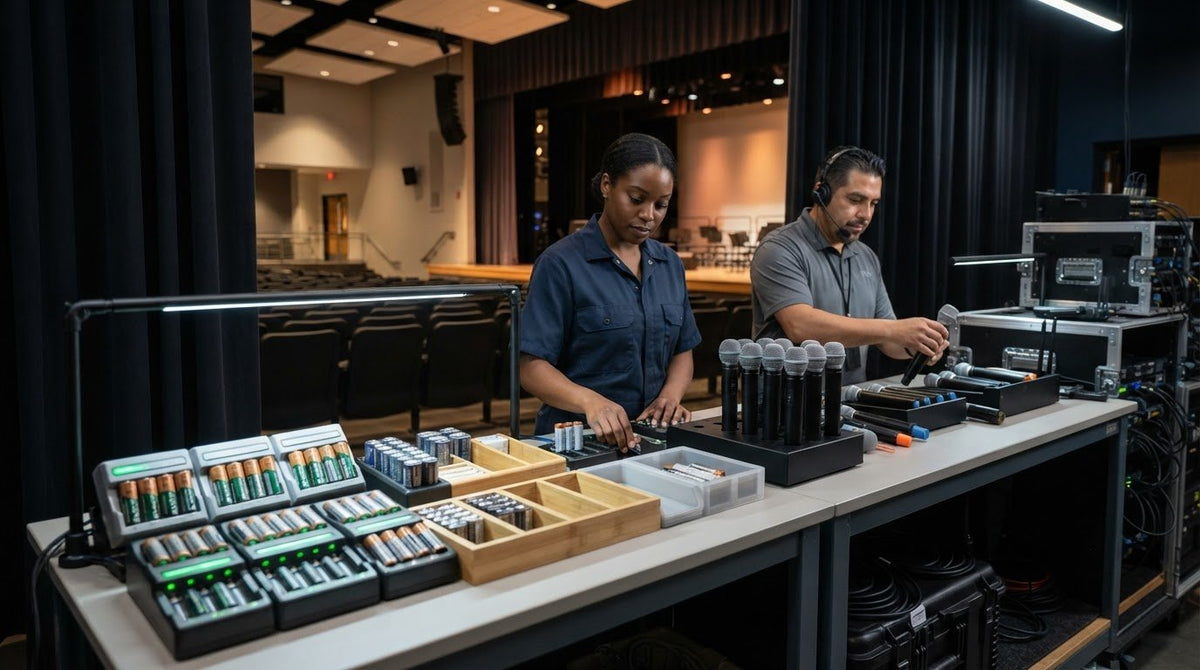
Dead batteries can turn a carefully planned auditorium event into a last-minute scramble. The challenge isn’t simply having enough AA cells. Staff need to know which batteries are charged, where to find them, and whether they’re ready when microphones are needed. AA battery charging systems for school auditoriums work best when capacity, turnaround time, storage, and staff routines are planned together.
To estimate how many batteries or charging positions your equipment needs, start with the event schedule, microphone demand, and time available between uses. This guide explains how to check device requirements, plan battery and charger capacity, and create a repeatable process for charging, storing, and issuing cells. It also compares rackmount and distributed options and shows how inventory routines can help staff prepare for scheduled events and unexpected use.
Key Takeaways
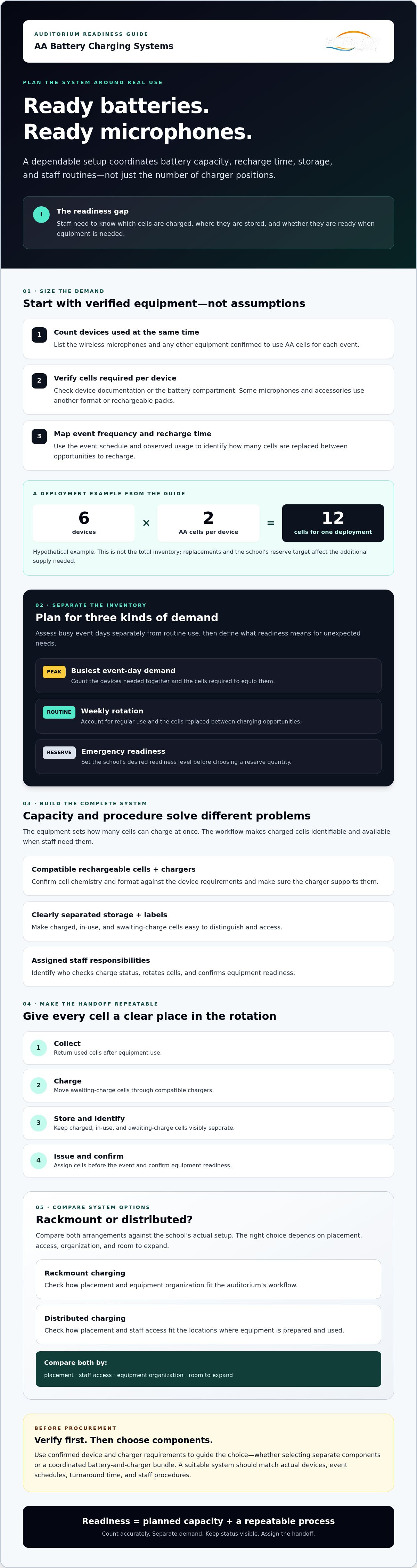
- Build your battery count from the auditorium’s actual devices, cells per device, event schedule, and time available to recharge.
- Plan separately for peak event demand, routine weekly use, and a clearly defined emergency reserve.
- Compare rackmount and distributed AA battery charging systems for school auditoriums by placement, staff access, equipment organization, and room to expand.
- Set a consistent handoff routine so staff know who checks charge status, rotates cells, and confirms equipment readiness.
- Use verified device and charger requirements to guide procurement, whether you select separate components or a coordinated battery-and-charger bundle.
Why AA battery charging systems matter in a school auditorium
Wireless microphones can put several batteries into use at once, then return them to the charging queue together after an event. If staff rely on last-minute charging or replace cells without tracking them, the next rehearsal or assembly can begin with uncertainty about which batteries are ready. A managed process makes readiness visible and repeatable. It doesn’t assume rechargeable cells will automatically reduce costs.
An AA battery charging system is a coordinated set of compatible rechargeable cells, chargers, storage, labels, and staff procedures for keeping AA-powered equipment supplied. Each part matters. A charger may have enough positions, but that capacity won’t help if charged cells aren’t identified, stored accessibly, or assigned before an event. A rechargeable battery can be used repeatedly through charging, but the cell type and device requirements must guide the choice.
Which auditorium devices create recurring AA battery demand?
Start with an equipment inventory, not an assumption about microphone design. Check the documentation or battery compartment for each wireless microphone, then list any other AV equipment confirmed to use AA cells. Record how many cells each device takes and distinguish regularly scheduled use from occasional or emergency equipment. Some microphones and accessories use other battery formats or rechargeable packs, so verify each device before counting cells.
This inventory also shows where demand is concentrated. Regularly used microphones may need a dependable rotation between events, while rarely used equipment still needs a readiness check. Keeping those groups separate helps staff plan the supply without charging every cell on the same schedule.
What does a complete charging system include?
A complete setup combines compatible rechargeable cells and chargers with storage, labels, and assigned responsibilities. Confirm that the charger supports the cell chemistry and format required by the devices. Use storage that makes charged, in-use, and awaiting-charge cells easy to distinguish, and assign someone to check status and maintain that separation.
Capacity and procedure solve different problems. The equipment determines how many cells can be charged at once; the workflow determines whether charged cells are available when staff need them. An ad hoc charging routine can leave staff managing supplies reactively. A defined collection, charging, storage, and handoff process gives every cell a clear place in the rotation.
The suitable arrangement depends on device requirements, event schedules, turnaround time, and staff procedures. Select AA battery charging systems for school auditoriums around those confirmed conditions, rather than a generic microphone count or an assumed charger capacity.
How to size an AA battery charging system for auditorium demand
Size the system according to the cells your equipment uses and the time staff have to prepare them, not a generic auditorium estimate. Assess the busiest event day separately from ordinary weekly use, then set an emergency reserve based on the school’s readiness needs. These steps turn actual demand into a practical battery inventory and charging plan.
- Count devices used at the same time. Record the wireless microphones and other confirmed AA-powered equipment needed for each event.
- Check cells per device. Verify each device’s requirements. Don’t assume every microphone or accessory uses AA cells.
- Map event frequency and usage. Note how often devices are used and how many cells are replaced between opportunities to recharge, using observed experience where available.
- Separate demand types. Calculate peak event-day needs, normal weekly rotation, and occasional or emergency-use inventory separately.
- Set a reserve target. Decide what level of readiness the school expects if cells are depleted or unavailable before choosing a reserve quantity.
How do device counts translate into battery requirements?
Multiply the number of simultaneously used devices by the verified cells required by each device. Then account for replacements between charging opportunities based on the event schedule and actual usage. For example, a hypothetical setup with six devices requiring two AA cells each would need 12 cells to equip those devices at once. That figure describes one deployment, not the total inventory. Additional cells depend on replacement patterns and the school’s chosen reserve.
Event use also calls for orderly handling. University of Sheffield researchers have highlighted the need for clearer guidance around battery safety in theatre environments. Schools should use equipment documentation and applicable local guidance when setting handling and charging procedures.
How many charging positions should a school plan for?
Count how many cells may need recharging before the next scheduled use, then compare that number with the charger’s verified charging positions and documented cycle duration. If the charger holds fewer cells than the batch requires, check whether there’s enough turnaround time for successive cycles. Confirm supported chemistry, cell format, capacity, and charging time in the specific charger documentation. Don’t assume one charger quantity or cycle time fits every auditorium.
Illustrative calculation: If the hypothetical six-device setup above returns 12 cells for charging, staff need to check whether the selected charger can process them within the available interval. The example doesn’t provide charger specifications or a school schedule, so it can’t establish a recommended number of positions. Compare confirmed device needs with available AA battery and charger options, then verify each configuration’s specifications before selecting it.
Rackmount or distributed chargers: compare auditorium system options
Rackmount and distributed chargers organize charging in different ways. A rackmount setup may suit an auditorium where AV equipment is already housed in racks and staff benefit from a central charging location. Distributed chargers can place charging closer to the rooms or equipment where staff use them. Neither arrangement is automatically better. Choose based on where batteries are collected, who handles them, and how charging fits into event preparation.
| Consideration | Custom rackmount chargers | Distributed chargers |
|---|---|---|
| Installation context | Evaluate this option when the auditorium already uses AV equipment racks. Confirm rack dimensions, ventilation, power, and installation requirements for the specific configuration. | This may fit locations where staff need charging near separate equipment or work areas. Check each placement and its power requirements. |
| Staff access | A central location can support a shared routine, provided the responsible staff can access it during normal preparation. | Local placement may be convenient for nearby users, but staff need a clear process for checking and collecting batteries from each location. |
| Equipment organization | Charging equipment can stay grouped with rack-based AV equipment. Plan separate, labeled storage for charged and used cells. | Flexible placement is possible, though multiple charging points may require consistent labels and status checks. |
| Expansion considerations | Verify available rack space and the selected charger’s documented capacity before planning for future needs. | Consider how additional units would affect access, power, and oversight. Confirm specifications for each charger. |
When should a school consider custom rackmount charging?
Consider rackmount charging if the auditorium’s AV equipment is already organized in racks and staff want charging managed in one location. A central setup may simplify collection and status checks, but only if staff can access it as part of their regular workflow. Before selecting a configuration, verify rack dimensions, ventilation, power, and installation requirements. For more evaluation criteria, see the enterprise battery charging solutions buying guide.
How should schools compare rechargeable cell and charger compatibility?
Check the documentation for both the rechargeable AA cells and the charger. Match cell chemistry, format, voltage, and charging requirements to the device and charger instructions. A charger’s appearance or rack format doesn’t establish compatibility. Confirm that the specific charger supports the specific cells, and avoid relying on unverified assumptions about charging speed, cycle life, or device runtime.
Compare options against the school’s confirmed equipment needs and staff procedures. The most suitable AA battery charging systems for school auditoriums are those whose placement, verified specifications, and everyday workflow work together.
A repeatable school auditorium workflow for charging, storage, and handoffs
A dependable battery routine makes event preparation easier to verify, even when equipment passes between staff members. Define who collects cells after use, who checks charging status, and who confirms the microphone or other equipment is ready for its next assignment. Keep the process simple enough to follow during a busy event week.
What should an auditorium battery checkout routine include?
Use a written checklist or shared log rather than relying on memory. A paper sheet or spreadsheet can track equipment, battery handoffs, returns, and readiness. Assign responsibility at each handoff so the next person knows whether batteries are installed, ready to use, or awaiting charging.
- Before an event: Record which equipment is assigned, who issues it, and who confirms readiness.
- After use: Return equipment and cells to the designated collection point, and note any cells that need charging.
- Before storage or reassignment: Confirm status labels and update the log so staff can see what is available.
Fit return and recharge steps to the school’s actual staff schedule. If equipment passes from a teacher to an AV technician, make that exchange explicit instead of assuming someone else will collect or charge the batteries. The professional battery storage and management system guide offers more context for organizing storage and responsibility.
How can schools store and rotate rechargeable AA batteries?
Set up clearly marked locations for charged, in-use, and depleted cells. Use consistent labels on storage areas and tracking sheets. Keep cells organized and protected, and follow the battery and charger manufacturers’ instructions for storage and maintenance. A first-in, first-out rotation can help staff issue cells in an orderly way, provided it follows those instructions.
Give one person responsibility for checking the storage area and resolving unclear statuses. If several staff members manage equipment, use the same terms and return location across the team. For practical considerations when adopting rechargeable cells, see the business guide to switching to rechargeable batteries.
With AA battery charging systems for school auditoriums, the process matters as much as the equipment. Clear assignments and status checks help turn available charging capacity into ready-to-use cells. Review rechargeable AA batteries, chargers, and storage options against your confirmed equipment requirements and workflow.
How to choose an AA battery charging system for your school
Turn your equipment inventory and event schedule into a procurement brief before comparing options. The goal isn’t to select the largest charger or a particular format by default. It’s to choose rechargeable cells, charging equipment, and storage that match documented device requirements and the school’s daily workflow. A clear brief also helps suppliers provide configuration details you can verify.
What should a school confirm before requesting a system recommendation?
Gather the information that determines actual demand and fit. Include device models, confirmed battery formats, cells required per device, event schedules, and details for any chargers already in use. Note whether AV equipment is rack-based, where batteries will be stored, who will check charging status, and whether new equipment may change requirements.
Use this checklist to compare proposals:
- Device requirements: Identify the equipment and verify each battery type and cell count against its documentation.
- Charging fit: Ask suppliers to document charger compatibility with the exact rechargeable cells, including chemistry, format, and charging requirements.
- Capacity and timing: Compare the cells that need charging with documented charger capacity and cycle timing, measured against the school’s event schedule.
- Placement and storage: Confirm rack availability and configuration requirements, or identify practical locations for separate chargers and battery storage.
- Ownership and growth: Decide who manages charging and inventory, and describe likely equipment changes that may affect future needs.
Compare standalone components with a coordinated battery-and-charger bundle by reviewing the specifications of every included item. A bundle groups components for consideration, while separate purchases let a school select each item individually. Neither approach establishes compatibility on its own. Request written confirmation that the proposed cells and charger meet your devices’ requirements.
How can Horizon Battery support auditorium charging planning?
Horizon Battery offers high-capacity rechargeable AA batteries, charger-and-battery bundles, dedicated battery storage, and custom rackmount chargers. These products can be evaluated as components of a system based on the school’s confirmed device needs, storage plan, and installation context. Verify specific cell support, charger capacity, rack dimensions, and installation requirements for the configuration under consideration.
Horizon Battery has operated since 1998. Once you’ve assembled your equipment list and workflow requirements, discuss your auditorium battery requirements before selecting a configuration. Clear information about devices, schedules, storage, and staff ownership helps keep the selection focused on the school’s actual use.
Build a battery routine your auditorium can rely on
A dependable auditorium battery plan starts with confirmed equipment requirements, event schedules, and realistic turnaround time. Use those details to size your rechargeable cell supply and charging positions, then choose rackmount or distributed equipment based on staff access and the room’s setup. Clear labels, assigned responsibilities, and consistent handoffs help keep the system organized between events.
AA battery charging systems for school auditoriums work best when equipment and daily procedures are planned together. Verify compatibility and configuration details before choosing components, and make sure staff know how to check readiness and return cells after use.
Horizon Battery has operated since 1998 and offers rechargeable AA batteries, charger bundles, battery storage, and custom rackmount chargers. Share your device requirements and workflow to explore relevant options. Discuss your auditorium battery requirements to take the next step toward a process your team can manage with confidence.
Frequently Asked Questions
How many AA rechargeable batteries does a school auditorium need?
Start with an inventory of AA-powered devices, the cells each requires, and how many devices operate at the same time. Then account for event frequency, observed battery use, and the time available between uses to recharge cells. Set an emergency reserve based on the school’s readiness needs. The right quantity varies with equipment and workflow, so treat sample calculations as planning aids, not universal recommendations.
Can rechargeable AA batteries be used in school wireless microphones?
Yes, if the microphone manufacturer permits rechargeable AA cells and the selected batteries meet the device’s requirements. Check the microphone documentation for supported chemistry and voltage before choosing cells. Confirm that the charger is compatible with those exact batteries, since charger support is a separate requirement. Before relying on the combination for an event, test it in representative equipment and follow the manufacturers’ instructions.
How many charging slots should an auditorium battery system have?
Base the number of charging positions on how many cells need recharging within the available turnaround window. Consider simultaneous device use, event timing, reserve cells, and the cycle duration documented for the selected charger. If a batch exceeds the available positions, check whether sequential charging can finish before the next use. There’s no universal slot count, so calculate from actual equipment demand and the school’s schedule.
Is a rackmount battery charger better for a school auditorium?
Not necessarily. A rackmount charger may suit an auditorium where AV equipment is already organized in a rack and staff benefit from centralized charging. Distributed chargers may be more practical if equipment is managed in separate locations. Compare staff access, installation requirements, workflow, and verified battery compatibility. Before choosing a rackmount configuration, confirm its dimensions and other requirements against the available rack space.
What happens if rechargeable AA batteries are left uncharged before an event?
Devices may not be ready when staff need them, which can disrupt setup or require a backup plan. A consistent return, recharge, and readiness-check routine helps reduce this risk. Keep reserve cells organized and separate from depleted cells, label their status clearly, and assign someone to confirm equipment readiness before each event. This makes it easier to identify missing or uncharged batteries before they affect preparations.
How much does an AA battery charging system for a school auditorium cost?
The total depends on the number and type of batteries, charger configuration, storage needs, and any rack or installation requirements. Request a proposal based on the auditorium’s device inventory and event schedule rather than comparing a charger alone with a complete setup. Ask for written specifications and a clear list of included components. Quotes may cover different configurations, so check what each one includes before comparing them.
How should a school store rechargeable AA batteries between events?
Use a consistent, designated storage location and separate ready-to-use cells from depleted ones so staff can identify their status quickly. Labels on storage areas or containers can support this routine. Follow the battery and charger manufacturers’ instructions for storage and maintenance. Assign someone to collect cells after events, return them to the correct location, and check that the batteries needed for the next scheduled use are ready.
Do auditorium AA chargers work with every rechargeable battery?
No. Compatibility depends on the charger’s supported cell format and chemistry, along with the battery manufacturer’s charging requirements. Check the documentation for both products before using them together. AA size alone doesn’t establish compatibility, so don’t assume a charger supports every rechargeable AA cell. Confirm the exact battery and charger combination before standardizing it for auditorium equipment or relying on it for an event.