

The most reliable church rechargeable systems aren’t necessarily the ones with the highest-capacity batteries. Wireless microphones and other AV devices have specific battery format and chemistry requirements, while the charging setup needs to keep enough compatible cells ready for services, rehearsals, and events.
If your team has struggled to check battery and charger compatibility or track which cells are charged, in use, or depleted, you’re not alone. A dependable system involves more than choosing rechargeable batteries. This guide explains how to match batteries and chargers to your equipment, service schedule, and charging workflow.
You’ll learn how to check device requirements, compare rechargeable battery formats and chemistries, and choose charging capacity based on the batteries your church keeps in circulation. You’ll also find practical steps for charging, labeling, and storing cells, so volunteers can prepare equipment consistently and identify what’s ready before the next service.
Key Takeaways
- Build church rechargeable systems around the devices they power and your service routine, not battery capacity alone.
- Check whether each device uses AA, AAA, or 9V batteries, and treat mAh as a capacity measure rather than a guaranteed runtime.
- Choose charger capacity based on how many batteries need charging at once, how many spares you keep, and the time between services.
- Use a consistent rotation routine: label compatible sets, charge and check them, deploy ready batteries, then return used cells to organized storage.
- Compare compact, mixed-format desktop, and rackmount setups to find an approach that fits your equipment and charging volume.
Church Rechargeable Systems: Start With Your AV Equipment and Service Routine
A microphone that powers down during a service can interrupt a speaker, musician, or worship leader at the moment they need to be heard. Reliable church rechargeable systems start with understanding what your AV equipment requires and setting up a routine that keeps compatible, charged batteries ready.
A complete system has three parts: rechargeable cells that meet each device’s specifications, chargers designed for those cells, and an organized routine for charging, checking, deploying, and storing batteries. Rechargeable batteries come in different types, sizes, and applications, so it’s useful to understand the basics of a rechargeable battery before choosing equipment. The device manual remains the authority on compatibility.
Before selecting batteries or chargers, make an inventory. For each device, record:
- Device name and model, along with the battery format stated in its manual or on its label.
- Required chemistry and acceptable voltage, if specified by the manufacturer.
- How many units are used at the same time, plus the number needed for rehearsals and events.
This record shows whether your setup mainly uses AA, AAA, 9V, or a combination. It also helps you estimate the number of batteries in circulation and keep incompatible cells from being grouped together.
Which church devices commonly use replaceable batteries?
Wireless handheld microphones, in-ear monitor receivers, bodypack transmitters, and other battery-powered AV devices may use replaceable cells. Requirements vary by model: one may call for AA batteries, while another uses AAA or 9V, a proprietary pack, or a specific chemistry and voltage. Don’t assume every microphone accepts AA cells. Check each manual or battery-compartment label before buying, and follow the manufacturer’s specifications.
How do services and events shape battery demand?
Count the wireless devices needed for a regular service, rehearsal, and larger event. Note which devices run continuously and which are used only for shorter segments. Then track actual battery use across your normal schedule. Use those observations to estimate how many charged spares to keep ready and how much time you have to recharge between events. Your equipment use, rather than guesswork, should determine the reserve.
Compare Rechargeable Batteries for Church Mics and AV
Choose the battery format first, then compare capacity and chemistry among the cells your equipment can use. AA, AAA, and 9V batteries aren’t interchangeable. A wireless microphone may require AA cells, while an in-ear monitor receiver or other AV device may specify a different size, chemistry, or voltage. Check the manual and current battery documentation before choosing a rechargeable replacement.
Capacity, usually shown in milliamp-hours (mAh), helps compare batteries of the same format and chemistry. It doesn’t guarantee runtime. Actual operating time depends on the device and how it’s used, so the largest mAh number doesn’t automatically mean the best result. For church rechargeable systems, device compatibility matters more than choosing the highest-capacity battery. For more context, see Ansmann High Capacity Batteries: 2026 Professional Guide.
Rechargeable nickel-metal hydride (NiMH) cells and alkaline cells have different specifications and charging requirements. Alkaline cells aren’t rechargeable, so never place them in a charger. For NiMH replacements, confirm the device supports that chemistry and check the battery’s voltage and dimensions against manufacturer guidance. The U.S. Consumer Product Safety Commission provides background on battery voluntary safety standards. Check product documentation for safety information specific to the battery and charger you choose.
When should a church consider high-capacity AA batteries?
The Ansmann AA 2850 mAh Slimline is an option to evaluate for compatible equipment with dimension-sensitive battery compartments. Its listed capacity is one point of comparison, not a runtime promise. Before ordering, confirm the device accepts rechargeable AA NiMH cells and that the Slimline dimensions fit. Check the current product listing for pack sizes and specifications, as product details can change.
When do AAA or 9V rechargeable batteries make sense?
Consider Max E Pro AAA cells only for devices whose manufacturers specify compatible rechargeable AAA batteries, and verify current product specifications before purchase. For equipment designed for 9V batteries, the Ansmann 9V 300 mAh Low Discharge option may be worth evaluating. Low self-discharge can be useful when cells sit between uses, but stored charge and operating performance depend on storage conditions and the device. Confirm chemistry, voltage, fit, and charger compatibility first.
Once you’ve identified the required formats, compare compatible rechargeable batteries for church AV and check current product details before selecting a set.
Choose Church Rechargeable Systems by Charger Capacity and Equipment Setup
A charger with more bays isn’t automatically a better fit. Start with how many batteries need charging at once, how many spares you keep, and how much time you have between services. If your team uses multiple battery formats, confirm that the charger supports each format and the chemistry of the cells you plan to charge.
Charger capacity is a workflow decision, not simply a feature count: choose enough compatible bays to prepare your rotation on schedule. Then check the specifications for any management features you need. Individual battery monitoring, display information, testing, and refresh functions vary by model. Verify what each charger provides rather than assuming these features are standard. Professional AV discussions of professional rechargeable options can also help you think through the needs of equipment used in live environments.
Which desktop charger fits a smaller church AV setup?
For compatible AA or AAA cells charged in small batches, the Powerline 4 Light is an option to evaluate. Its listed features include an LCD display and a USB charging socket. If your inventory also includes 9V batteries, compare the Energy 4 and verify its current supported formats and specifications. Choose based on the batteries you use, not just the number of bays.
Consider how volunteers will identify ready cells and whether the charger’s display gives them the information they need. If you want testing or refresh functions, check the product documentation to confirm they’re included. A display alone doesn’t establish that a charger has those functions.
When is a multi-bay or rackmount charger worth comparing?
The Powerline 8 may suit a setup that needs to charge multiple compatible AA or AAA cells together. For a larger or more organized equipment installation, compare desktop charging with professional rackmount equipment. Assess Fischer Amps rackmount models by supported battery format and bay count, and check each model’s current specifications before selecting one.
Rackmount charging may fit a church that needs a dedicated, centralized setup, while desktop units may be easier to place near a smaller battery rotation. Consider where batteries will be collected and stored, who will handle charging, and whether the time between uses is sufficient for the setup. The broader guide Enterprise Battery Charging Solutions is another resource to consult when evaluating infrastructure needs.
To compare church rechargeable systems, list your battery formats, the number of cells that must charge at the same time, and the charger functions your team will use. Then confirm compatibility and current specifications for each option before deciding.
Build a Reliable Church Battery Rotation and Avoid Common Buying Mistakes
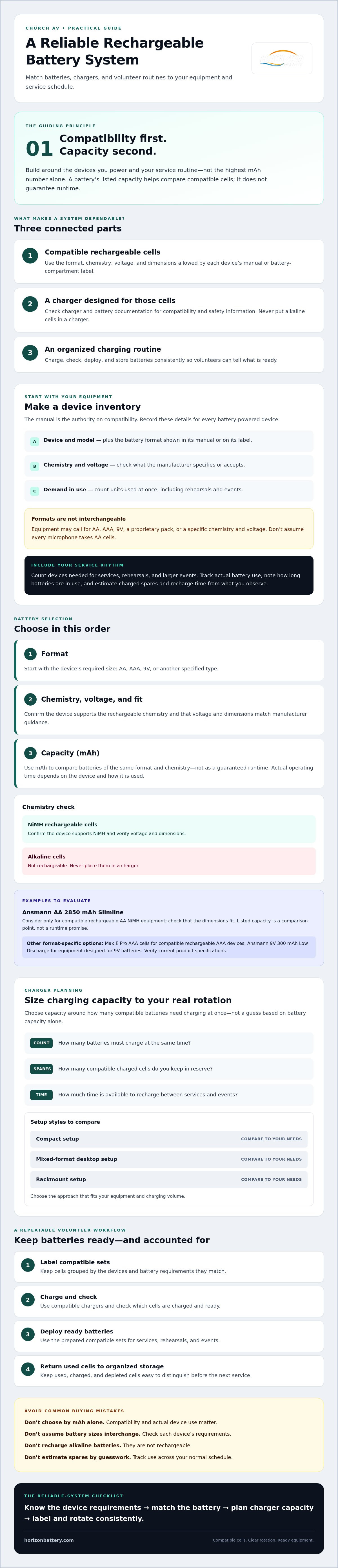
A consistent handoff routine helps volunteers identify ready batteries without relying on memory. Group cells by format and intended device, then move them through clear stages: charged, in use, and awaiting charge. Don’t combine different chemistries or formats in one group, and use each charger only with battery types it supports.
Use a simple rotation for each compatible set:
- Label: Mark batteries or sets by format and intended device group.
- Charge: Put used cells in the designated awaiting-charge area and charge them according to the battery and charger instructions.
- Check: Confirm the set is ready before it goes into service. A battery tester can be an optional screening tool, but it doesn’t replace manufacturer guidance or a device check.
- Deploy and return: Put ready batteries into use, then return used cells to the correct area after the service or event.
How can a church keep batteries ready between services?
Assign a consistent person or team to oversee charging and handoffs. Use labeled containers or clearly marked storage areas to separate fully charged, in-use, and awaiting-charge cells. After services, note any batteries that needed replacing or devices that behaved unexpectedly. These records help identify recurring needs and ensure future purchasing decisions reflect actual use.
What mistakes can lead to an unsuitable system?
Buying by capacity alone can leave you with batteries that don’t fit or meet a device’s operating requirements. Counting only the batteries in use can also underestimate demand when services, rehearsals, or events overlap. Before ordering, check the charger’s supported formats and chemistry, then confirm current product availability and specifications. Keep each device’s instructions accessible so volunteers can answer questions without guessing.
Good organization also makes the system easier to hand over when volunteers change. Set a routine, label storage clearly, and record exceptions instead of relying on informal knowledge. This practical approach helps church rechargeable systems stay manageable as equipment and schedules evolve.
Explore rechargeable batteries and charging options for churches to compare equipment for your rotation.
Select Your Church Rechargeable System and Compare Current Options
The right setup depends on the devices your church uses, how many batteries need charging together, and how volunteers will manage the rotation. A compact AA or AAA arrangement may suit a smaller inventory. A mixed-format desktop charger may be worth comparing if your equipment uses several battery sizes. For a centralized professional installation, consider rackmount charging equipment. These are starting points, not one-size-fits-all recommendations.
Product options to evaluate include the Ansmann AA 2850 mAh Slimline for compatible, dimension-sensitive equipment and the Ansmann 9V 300 mAh Low Discharge battery for compatible 9V devices. For charging, compare the Powerline 4 Light and Powerline 8 against the formats and quantities you need to support. Horizon Battery also offers high-capacity AA rechargeable batteries, charger and battery bundles, the Pure Power Series, custom rackmount chargers, and battery storage. Confirm current specifications and availability before deciding whether an option fits.
What should the church confirm before choosing products?
Use a brief checklist before ordering:
- Device requirements: Confirm each device’s battery format, chemistry, voltage, dimensions, and manufacturer-approved specifications.
- Charging demand: Count the cells needed at once, including spares, and choose enough compatible charging bays to support your rotation.
- Order details: Verify current product availability, bundle contents, charger compatibility, and product specifications.
Capacity or bay count alone won’t establish whether a product works with your equipment. Check the details for the exact battery and charger combination you plan to use. If a first-time church customer discount is currently offered, verify eligibility and terms before including it in your purchasing decision.
How can a church move from comparison to a practical setup?
Start with the devices creating the greatest operational need, such as equipment used regularly during services. Select compatible batteries and charging equipment for that group, establish the charging and storage routine, then extend the approach to other devices and formats. This measured changeover makes it easier to assess the setup before adding more battery types or charging capacity. For broader planning, consult Switching to Rechargeable Batteries: 2026 Business Guide.
Use your equipment inventory and service schedule to compare church rechargeable systems by application, format, and charging volume. Compare rechargeable systems for your church, and confirm current product details before choosing a setup.
Build a Battery Routine Your Team Can Rely On
A dependable church battery setup starts with the equipment, not a capacity number. Confirm each device’s battery format and manufacturer requirements, then choose compatible cells and chargers that can keep pace with your service schedule. A clear routine for charging, checking, and storing batteries helps volunteers know what’s ready and reduces last-minute uncertainty.
Whether your needs call for rechargeable batteries, charger bundles, desktop chargers, or rackmount options, match the setup to your devices and charging volume. Verify current product specifications and availability before ordering. Horizon Battery has operated since 1998 and offers options for a range of church AV applications.
Use your equipment inventory and service routine to guide your next step. Compare rechargeable systems for your church and explore options suited to your battery formats and workflow. With compatible equipment and a repeatable routine, church rechargeable systems can help your team prepare with greater confidence for services and events.
Frequently Asked Questions
Are rechargeable batteries suitable for church wireless microphones?
Yes, if the microphone manufacturer approves the rechargeable battery’s format, chemistry, and voltage. Check the manual or battery-compartment label before switching from alkaline cells, and use a charger specified for the rechargeable type. Compatibility can vary between microphone models, even within the same church setup. Test the chosen batteries in the actual equipment and confirm your team can keep charged spares ready for services.
Which rechargeable batteries are best for church wireless microphones?
The best choice is the compatible battery type specified for each microphone, not automatically the cell with the largest capacity. Some models use AA batteries, while others require a different format or chemistry. For a compatible AA device, a high-capacity rechargeable NiMH option may be worth evaluating. Check the manufacturer’s requirements, battery dimensions, and charger support, then verify current product specifications before ordering for your church rechargeable systems.
Can a church use rechargeable batteries in in-ear monitors?
Yes, when the in-ear monitor manufacturer specifies rechargeable cells as compatible. Check the receiver’s manual for battery format, chemistry, and voltage, since requirements may differ from those of wireless microphones. Some receivers use replaceable batteries, while other equipment may use a dedicated rechargeable pack. Use only the charger intended for the selected cells or pack, and test the complete setup before relying on it during a service.
How many rechargeable batteries does a church need?
Base the quantity on the number of devices used at the same time, the battery format each device requires, and how many charged spares you need between services or events. Track actual use during services and rehearsals to estimate your rotation instead of relying on a fixed rule. Also consider how quickly your chargers can prepare used cells. This gives you a practical estimate of the batteries and charging bays to evaluate.
Can one charger charge AA, AAA, and 9V batteries?
Some chargers support more than one battery format, but don’t assume a single unit accepts AA, AAA, and 9V cells or every chemistry. Check the charger’s current specifications for supported formats and battery types, and follow the battery manufacturer’s charging guidance. Match each cell to an approved bay and charging mode. If your inventory includes several formats, confirm compatibility for each before buying a mixed-format charger.
Are rackmount battery chargers necessary for a church?
No. A desktop charger may be sufficient if your church charges a modest number of compatible batteries and can manage them easily between services. Rackmount equipment is worth comparing when a larger inventory or centralized charging arrangement better fits your AV setup and team workflow. Consider battery formats, charging volume, available space, and how volunteers will access charged cells. Confirm the specifications of any rackmount model before selection.
How should a church organize rechargeable batteries between services?
Keep batteries grouped by format and intended device, with clear storage areas for charged, in-use, and awaiting-charge cells. Label compatible sets, assign a person or team to oversee charging and handoffs, and return used batteries to the correct location after each service. Record recurring issues, such as cells that need replacing sooner than expected. This routine helps volunteers identify ready batteries and reduces mix-ups during busy preparations.