

A battery case can look organized and still slow a production changeover. If charged and depleted cells share a space without a clear status cue, technicians have to stop and sort when they need to move quickly. The best audio technician battery organizer cases make the next step obvious: identify what is ready, what needs charging, and what should be replenished.
A useful case does more than hold batteries. It should fit your team’s battery formats, working quantities, and production environment, while supporting clear handoffs between technicians. A consistent status system matters as much as the case itself because it reduces guesswork during busy shifts.
This guide explains which case features support organized handling and how to compare styles against your production needs, not appearance alone. You’ll also learn how to separate charged and depleted cells, track inventory, and replenish stock with a repeatable routine. The goal is a clear battery workflow from storage through charging and back into use.
Key Takeaways
- Inventory battery formats and quantities first, so you can compare organizer options against your team’s actual needs.
- Compare hard cases, compartment organizers, and pouches by protection, visibility, portability, capacity, and access.
- Separate charged and depleted cells clearly to make status checks and technician handoffs easier.
- Build a repeatable sorting routine, and use status labels only according to your team’s verified charging or testing process.
- Use this checklist to evaluate audio technician battery organizer cases with any supplier, then confirm dimensions and features before buying.
Why audio technicians need a battery organizer case built around production workflow
During a changeover, one technician might replace batteries in wireless microphones while another prepares the next kit. If used cells go back into the same compartment as ready ones, the team has to pause and check each battery before relying on it. A consistent layout makes status and placement easier to read at a glance.
An audio technician battery organizer case is a storage system for containing, sorting, and identifying batteries so a production team can locate and handle them consistently. It might use separate compartments or another clear arrangement. Its value depends on how easily the team can follow that system during setup, operation, and handoff.
Where battery organization matters during audio production
Wireless microphones and other battery-powered audio equipment need attention as kits are prepared, equipment changes hands, or batteries are replaced. In a shared kit, one technician may not know which cells the previous user removed or returned. Unclear status can lead to repeated checks and delays, especially when several devices need to be prepared in sequence.
Assign a repeatable location to each battery type and status. When everyone returns cells to the designated place, the next technician can find them without searching through mixed batteries. This supports the workflow, but it does not replace checking that a battery is appropriate for the equipment.
What an organizer can and cannot solve
A case provides physical containment and can support a sorting method. It does not charge batteries, confirm their condition, or determine when they should be replaced. Unless a specific, verified feature measures battery status, the case itself cannot establish that a cell is charged or ready for use. A label or position only communicates what a person recorded.
Keep storage separate from charging and testing, and base readiness labels on the team’s verified procedure. For rechargeable batteries with electronic monitoring, a battery management system (BMS) is a separate electronic system that monitors and manages battery operation. An organizer case does not provide that function. Follow the battery and equipment manufacturers’ instructions for charging, use, and handling.
The most useful audio technician battery organizer cases support a broader battery management routine. They help keep cells identifiable and accessible, while charging, testing, and replacement decisions remain deliberate steps in the workflow.
Which battery organizer case features matter most to audio technicians?
The right organizer fits your team’s batteries and makes them easy to identify, retrieve, and return. Compare options against your workflow, not just compartment count or appearance. These features matter when comparing audio technician battery organizer cases:
- Battery format: List the cell types used across microphones, transmitters, and other equipment.
- Quantity: Count the batteries carried for a shift, including reserves, and check whether the layout keeps them sorted.
- Access: Consider how quickly a technician can retrieve and replace cells during a changeover.
- Status identification: Look for a practical way to distinguish charged, depleted, and unverified batteries.
- Transport: Match the case’s portability and closure to how the team moves and stores its kit.
Match the case layout to battery formats and quantities
Start with an inventory, not a product label. Record the formats your team uses and the quantity normally carried, including the reserve cells your workflow requires. Check the organizer’s stated compartment dimensions against the batteries themselves. A format name alone does not confirm fit, and spaces that are too tight or too large can make retrieval and sorting harder.
Consider where each type belongs. If a kit carries more than one format, separate, clearly identified zones can reduce mix-ups. Before buying, verify the dimensions and compartment layout, and check whether dividers can be repositioned if your inventory needs that flexibility.
Prioritize identification, access, and transport
Charged and depleted cells need visibly different locations or labels. Dedicated zones, removable dividers, or clear status markings can support that separation where available. Choose a method every technician can recognize and maintain. A label is useful only if the team updates it according to its established charging or testing process.
Then consider the working environment. Will technicians need to open the case quickly with one hand, carry it between work areas, or secure it inside a larger kit? Check how the closure works and whether the organizer suits the team’s actual travel and storage conditions. Do not assume a case protects batteries from impacts, moisture, or other conditions unless its verified specifications say so.
Safety requirements depend on the workplace and task. For example, OSHA’s battery-handling standard addresses marine-terminal workplaces. Confirm which requirements apply to your setting rather than treating that standard as universal.
Once the physical requirements are clear, consider how storage fits into the broader battery and charging workflow. Horizon Battery offers battery storage and charging products. Verify current product details and specifications before choosing an option for your setup.
Hard case, compartment case, or pouch: compare organizer styles for audio work
Different organizer formats suit different tasks. A structured compartment case can make designated battery positions easier to scan, while a protective enclosure may suit equipment that travels with other gear. A pouch can be a lighter option for a small kit that needs frequent access. These are general format comparisons, not claims about any specific supplier’s products. Construction and features vary, so verify each item’s specifications before buying.
| Format | Protection | Visibility | Capacity | Portability | Access |
|---|---|---|---|---|---|
| Hard case | May provide a more rigid enclosure; confirm its actual protective rating. | Depends on interior layout and whether contents are visible when opened. | Varies by size and internal arrangement. | Can be bulkier than flexible options. | May require opening the case fully to reach cells. |
| Compartment organizer | Varies; check the enclosure and closure. | Often supports quick visual checks when cells have separate positions. | Limited by compartment count and dimensions. | Depends on overall size and construction. | Designated spaces can make retrieval straightforward. |
| Pouch | Usually offers less structure; confirm how well it protects and contains cells. | Can be limited if batteries share an open space. | Flexible, but capacity and separation depend on design. | Often lightweight and easy to pack. | Can suit frequent access, provided cells remain easy to distinguish. |
These are broad tendencies, not guarantees. Compare each product’s dimensions, closure, internal layout, and stated materials. The right choice depends on where batteries are stored, how they travel, how often technicians need access, and how the team handles status and handoffs. No single style suits every production.
When a structured compartment organizer may fit the workflow
Choose this format if technicians benefit from returning each battery to a designated position and checking the layout at a glance. Confirm that compartments fit the actual cell sizes and the quantity carried, including reserves. A fixed layout may be less adaptable if the team changes battery formats or kit requirements.
When a protective case or flexible pouch may be more practical
A protective enclosure may suit batteries that travel alongside other equipment, while a pouch may work for a lightweight kit that needs frequent access. Check how securely either option closes and whether cells stay separated during movement. For rechargeable batteries, case choice is only one part of handling. Follow the manufacturer’s instructions. The IEC’s overview of international battery safety standards provides broader context on industrial lithium battery safety and performance.
Compare audio technician battery organizer cases against the team’s transport conditions and daily process, rather than selecting by appearance alone.
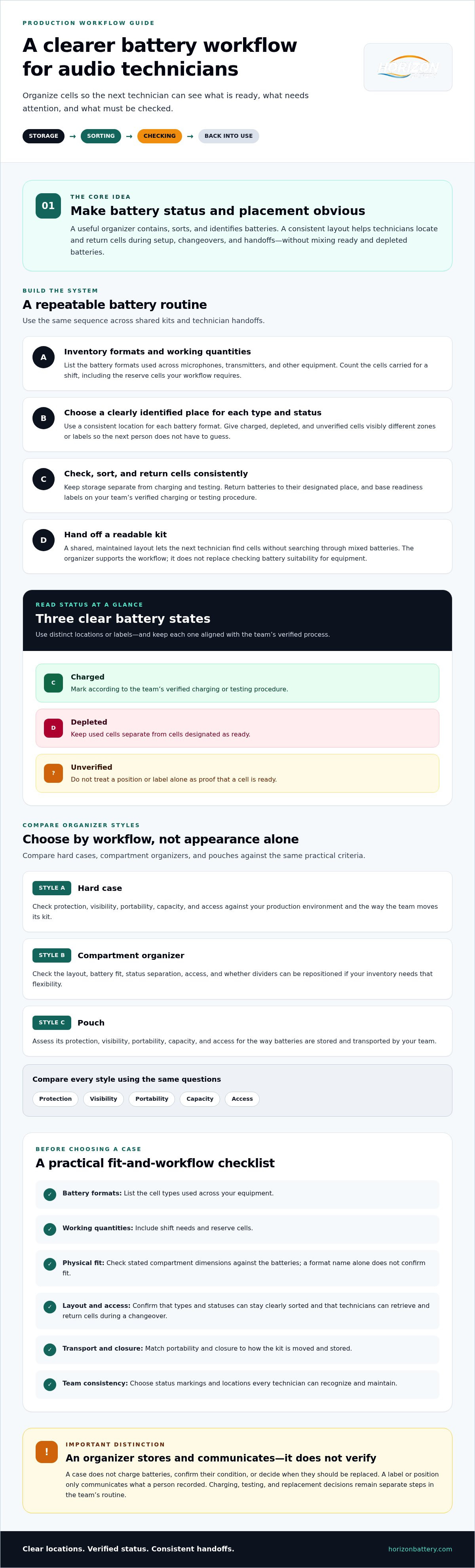
Build a repeatable system for sorting, checking, and handing off batteries
A case supports a battery workflow only when every technician uses it the same way. Agree on where cells go, what each status means, and who checks stock. A shared method reduces guesswork during handoffs and makes it easier to spot when supplies need attention.
Separate batteries by status without relying on guesswork
Use distinct, clearly marked locations for ready-to-use, depleted, and unverified cells. Choose labels or another status convention that every shift understands, then apply it consistently. For example, a cell returned without a confirmed charge or test should go in the unverified area, not be treated as ready based on its position or appearance.
A case label records a person’s status update; it does not measure charge. Base ready-to-use labels on the team’s verified charging or testing process, and follow the battery and equipment manufacturers’ instructions. This distinction keeps the organizer useful without asking it to prove more than it can.
Connect organizer use to charging and inventory routines
Use this straightforward handoff routine:
- Identify: Sort cells by format or kit, and set aside any that need a condition or compatibility check.
- Separate: Place batteries in the agreed ready, depleted, or unverified zone according to the team’s process.
- Return: Put each cell back in its designated location after use, rather than leaving it loose or mixing its status with other cells.
- Check: At the agreed shift or restock point, review counts, charging records, and cells needing follow-up.
Assign responsibility for the end-of-shift check and for flagging stock that needs replenishment. The organizer makes inventory easier to inspect, but it does not replace charging records or confirm a battery’s condition. Periodically review inventory, battery condition, and compatibility with the equipment in use. For more detail on the broader process, see this professional battery storage and management system guide.
Battery choice also affects the workflow. Consult the professional audio battery selection guide when comparing options for your application, and confirm compatibility with the equipment manufacturer’s instructions.
Consistent routines make audio technician battery organizer cases part of an accountable storage and charging process, rather than a place to put loose cells. Explore battery storage and charging products to consider how those categories may fit into your team’s wider workflow.
Choose audio technician battery organizer cases with a practical buying checklist
Make the decision in sequence: inventory the cells your team carries, define how technicians will use and hand off batteries, compare organizer formats, then verify the specific product’s fit. This keeps the choice tied to production needs instead of assumptions based on a product photo or a broad format label.
Questions to answer before selecting a case
Before comparing audio technician battery organizer cases, write down the details a supplier needs to confirm. This checklist helps you evaluate options consistently:
- Inventory: Which battery formats do your microphones, transmitters, and other equipment use? How many cells do you carry, including reserves?
- Workflow: Do technicians need quick visual checks, separate compartments, compact portability, or added protection during transport?
- Fit: Do the stated compartment dimensions accommodate your actual batteries, and will the layout suit the quantities you plan to store?
- Specifications: What materials, closures, dividers, labels, or accessories are included? Confirm each detail directly with the seller.
- Availability: Is the option currently available for your requirements? Verify this with the seller rather than assuming from a general listing.
How to evaluate a solution for an audio team
A suitable organizer should support a method technicians can follow across shifts. Consider whether the layout works with your existing status labels, charging records, and stock checks. If the team’s battery formats or kit quantities change, assess whether the organizer can still support the updated workflow.
Storage is one part of a broader setup. Review how the selected organizer will fit alongside your charging process, then periodically confirm battery condition and equipment compatibility using the relevant manufacturer guidance. Do not treat an unverified case feature or a marked compartment as evidence that a battery is charged or ready.
Horizon Battery offers battery storage and rechargeable battery products that may be relevant to a broader battery management plan. Verify specific case configurations and features in current product details, then compare the listed specifications against your checklist.
For a practical next step, explore Horizon Battery’s professional battery solutions as you plan storage and charging needs for your audio team.
Put a dependable battery workflow in place
The right organizer supports a clear routine: choose a format that fits your team’s batteries and working conditions, keep battery status easy to identify, and include handoffs and stock checks in the process. A case organizes cells, but your team’s verified charging and testing procedures determine whether they are ready for use.
Use your inventory and workflow to guide the final choice, then confirm dimensions, materials, closures, and included features directly with the seller. This keeps expectations grounded in the specific product rather than assumptions about a case category.
Horizon Battery offers rechargeable batteries, charger and battery bundles, and battery storage solutions. Explore Horizon Battery’s professional battery solutions to plan the next step for your audio team.
A consistent system makes audio technician battery organizer cases more useful in daily production. Start with a process your team can maintain, then choose products that fit it.
Frequently Asked Questions
What should an audio technician look for in a battery organizer case?
Choose an organizer that fits the battery formats and quantities your team carries, including reserve cells. Check whether its layout makes batteries easy to identify and retrieve, and whether the closure and construction suit your transport conditions. For audio technician battery organizer cases, status separation is also important: technicians should be able to distinguish ready, depleted, and unverified cells using a team-agreed method.
Can one battery organizer case hold both charged and depleted batteries?
Yes, if it has separate, clearly identified areas and the team follows the same sorting method. Keep depleted cells apart from ready-to-use batteries, and place cells with unknown status in a separate area until they have been checked. A label or compartment records a person’s status update; it does not confirm charge. Base readiness labels on your team’s verified charging or testing process.
How do audio technicians keep rechargeable batteries organized between shifts?
Use a consistent handoff routine: return each cell to its designated location, separate it by status, and record charging or testing according to the team’s process. At shift end, assign someone to check stock and flag cells needing attention or replenishment. Connect storage organization to charging records, and follow the battery and equipment manufacturers’ instructions for handling and compatibility.
Are hard cases better than pouches for organizing audio batteries?
Neither format is best for every team. A hard case may suit batteries that travel with other equipment, but confirm its actual construction and protective specifications. A pouch may be useful when a lightweight, flexible option and frequent access matter more. Compare how each format separates cells, how securely it closes, and whether technicians can retrieve and return batteries consistently in your work environment.
How can I prevent technicians from mixing charged and depleted batteries?
Create distinct, clearly marked locations for ready, depleted, and unverified cells, then use the same convention across shifts. Ask technicians to return cells to the correct area immediately after use and update their status only after the team’s established charging or testing process. Do not rely on appearance, color, or a case label alone as proof that a battery is ready.
What battery formats should I check before buying an organizer case?
Start with the formats specified for your microphones, transmitters, and other battery-powered equipment. Record each format and the quantity your team carries, including reserves. Then compare the organizer’s stated compartment dimensions with the actual batteries, rather than relying only on a format name or product photo. Confirm fit, layout, and relevant specifications directly with the seller before purchasing.
Does a battery organizer case show whether a rechargeable battery is fully charged?
No, not unless the specific organizer has a verified feature designed to measure or display battery status. A standard compartment, label, or position only shows how someone has sorted the cell. Use the appropriate charging or testing process to establish readiness, follow manufacturer guidance, and update the team’s status convention afterward. Keep unverified batteries separate until their condition has been checked.