

A gear bag can hold plenty of batteries and still leave a crew searching for a charged, undamaged cell when setup begins. Loose storage makes it easy to lose batteries, mix charged and depleted cells, or damage casings in transit. The right rechargeable battery accessories help turn scattered inventory into a more dependable workflow.
Reliable batteries matter, but the way you store, charge, and track them matters too. Professional users need a clear system that protects cells, makes their status easy to identify, and helps crews prepare equipment. This guide explains how to choose practical storage and charging equipment, and how to build routine battery checks into your operation.
We’ll cover organized storage, compatible charging equipment, and routine battery checks, including considerations for teams moving from alkaline to rechargeable power. Horizon Battery offers high-capacity AA rechargeable batteries, battery storage, charger and battery bundles, and custom rackmount chargers. Use this overview to create a consistent battery routine and keep essential gear organized for the next call.
Key Takeaways
- Choose rechargeable battery accessories that help protect cells from impact, loss, and accidental mixing during storage and transit.
- Assess cases by their material, latches, and hinges to determine whether they suit your working environment.
- Match portable storage or high-density organization to your operation’s needs, from mobile production to larger facilities.
- Set up a consistent system for handling wireless microphone batteries across services, classes, and other high-use settings.
- Consider how Horizon Battery’s storage, high-capacity AA batteries, Pure Power Series, and custom rackmount chargers could support your workflow.
Beyond the Cell: Why Professional Battery Accessories Are Essential for Gear Longevity
A rechargeable system needs more than cells. Without a way to store, separate, and track batteries, teams can lose time searching for charged units, send depleted cells into service, or damage batteries in transit. Loose cells in a gear bag may also have exposed terminals touch conductive objects, creating a risk of accidental discharge or short-circuiting.
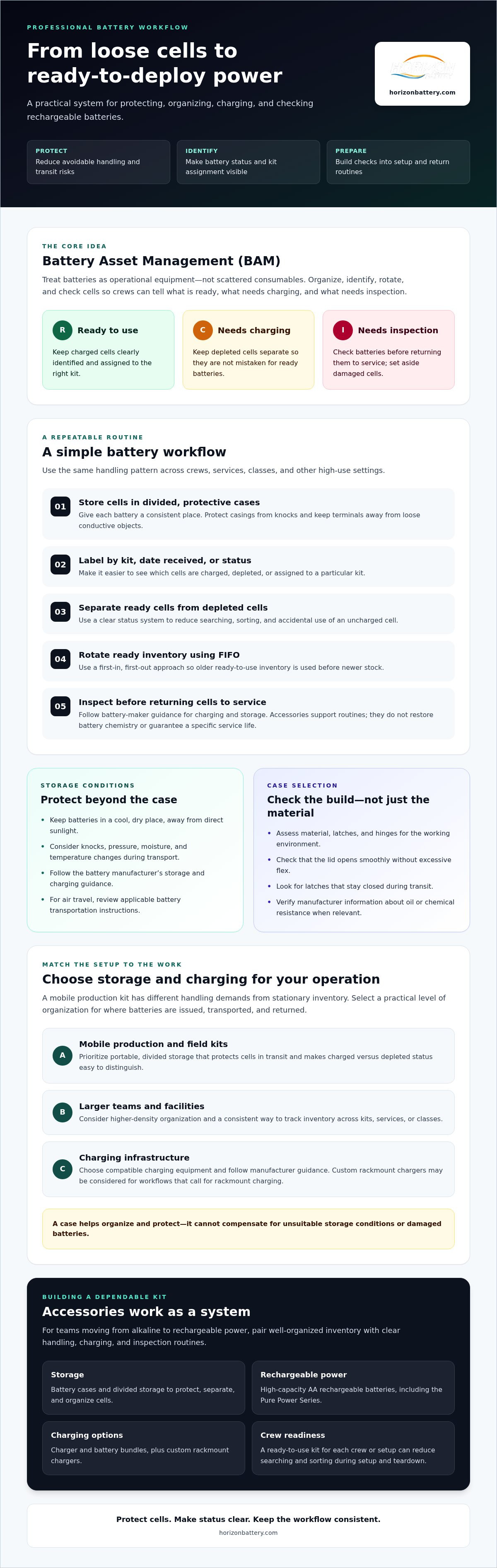
Professional rechargeable battery accessories can support Battery Asset Management (BAM), a consistent approach to organizing, identifying, rotating, and checking batteries as operational equipment. Instead of treating cells as disposable consumables, an organization tracks which batteries are ready to use, which need charging, and which require inspection. This approach helps teams make better use of their inventory and avoid preventable handling problems.
The Risks of Improper Battery Storage
Transport can expose batteries to knocks, pressure, moisture, and temperature changes. A protective case helps limit physical damage and keeps terminals from rubbing against loose metal objects. Keep batteries in a cool, dry place, away from direct sunlight, and follow the battery manufacturer’s storage and charging guidance. Storage accessories help organize cells, but they can’t compensate for unsuitable conditions or damaged batteries.
Retail packaging is designed to present and contain a product, not to support repeated field use. Once opened, small boxes and plastic sleeves can be misplaced or crushed in a busy gear bag. They also make it harder to see which cells are charged, depleted, or assigned to a particular kit. Divided storage gives each battery a consistent place, which is especially useful when crews handle equipment under time pressure.
Maximizing ROI Through Organization
Rechargeable cells are reusable, but their service life depends on appropriate charging, handling, and storage. Accessories don’t restore a cell’s chemistry or guarantee a particular number of cycles. They can help reduce avoidable wear by protecting cells from impact and supporting consistent routines. For background on how rechargeable chemistries differ, see Rechargeable battery.
Standardized cases also make inventory rotation more practical. Label compartments or cases by kit, date received, or status, then use a first-in, first-out (FIFO) approach so older ready-to-use inventory is used before newer stock. Keep charged and depleted cells separate, and inspect batteries before returning them to service. A ready-to-use kit for each crew or setup can reduce searching and sorting during setup and teardown.
For organizations moving from alkaline to rechargeable power, these controls turn battery handling into a repeatable workflow. Horizon Battery offers high-capacity AA rechargeable batteries, battery storage, and custom rackmount chargers. The goal is not simply to own more cells. It’s to keep the right batteries organized, protected, and ready for the work ahead.
Key Features to Evaluate in Battery Storage and Management Hardware
Battery storage is part of your equipment workflow, not just a container for spare cells. The right rechargeable battery accessories make batteries easier to protect, identify, transport, and return to service. Start by considering how the case will be used: a mobile production kit faces different handling demands than stationary inventory in a storage locker.
Durability and Material Standards
Polypropylene is a lightweight, durable thermoplastic used in many cases, but material alone doesn’t determine whether a case suits your needs. For daily production use, inspect the hinge and check that the lid opens smoothly without excessive flex. Look for secure latches that stay closed during transit. If cases will be used around stage or industrial equipment, check manufacturer information about resistance to oils or chemicals rather than assuming the material is suitable.
Before transport, confirm that batteries are held securely and their terminals are protected from contact with conductive objects. For air travel, review the FAA battery transportation guidelines, since requirements vary by battery type and travel conditions. A sturdy case supports safer organization, but it doesn’t replace checking applicable transport instructions.
Capacity and Density Considerations
Choose capacity to match how your team issues and returns batteries. An 8-cell case may suit an individual operator or a small kit; a 48-cell solution may be more practical for a larger crew or shared inventory. These are examples, not universal standards. Consider how cases fit into AV racks, lockers, and transport bags, and whether they stack securely without blocking access to other equipment.
Cell fit matters as much as case capacity. Slimline AA cells and standard high-capacity AA cells may differ in dimensions, so check the case’s compartment measurements against the exact battery model before choosing a system. For information about Ansmann cell options, see Ansmann high capacity batteries.
Make Status Visible
Color-coded cases or clear status labels help staff distinguish charged cells from depleted ones without checking each battery during setup. Set one consistent convention across the team, such as marking a case “ready” or “needs charging,” and keep the label visible when cases are stacked or stored. A system only works when everyone follows it.
To compare storage options for professional organization, start with Horizon Battery’s battery storage options.
Comparing Storage Solutions: From Field Cases to Custom Rackmount Infrastructure
The right storage format depends on where batteries are used, who handles them, and how quickly they need to be ready. Mobile crews benefit from compact cases that travel with a camera or audio kit. Schools and larger facilities may need centralized storage with clear labels and a repeatable check-in process. For AV teams with fixed equipment racks, a charging setup designed around the rack can help reduce loose chargers and cable clutter.
Portable vs. Permanent Storage
Individual 4-cell cases can work well for a technician or small field kit, keeping a set of batteries together between locations. Larger organizers are more practical for shared inventory, where staff need to sort cells by status, kit, or team. For equipment that uses less common battery sizes, custom foam inserts may help prevent shifting, but check material compatibility and fit before use. For a broader look at charging infrastructure, read this guide to enterprise battery charging solutions.
Centralized Charging and Rackmount Systems
In a fixed AV room or production rack, custom rackmount chargers can bring charging into the same organized space as other equipment. A 19-inch rack configuration may give teams a consistent place to charge batteries and help reduce scattered power supplies. Before selecting a system, check available rack space, charger compatibility, ventilation requirements, cable routing, and how staff will identify cells that are ready or still charging. Horizon Battery offers custom rackmount chargers, and the right configuration depends on your equipment and workflow.
Testing and Daily Readiness
A voltage reading is a useful quick check, but it doesn’t necessarily show how much usable capacity a battery can deliver under load. For pre-show checks, use a tester suitable for the battery chemistry and follow its instructions. Some testers can run a discharge test to estimate capacity, while a simple voltage check provides a more limited snapshot. Keep testing records consistent so staff can spot cells that repeatedly underperform.
Charging station organization can also make a difference. Separate cables by charger, give charged and depleted cells designated locations, and label stations so batteries don’t drift between teams. A compact field case, a bulk organizer, and a central rack setup can work together. Each serves a different point in the battery workflow.
Evaluate rechargeable battery accessories as part of your infrastructure. A storage case protects and groups cells, a rackmount charger supports centralized charging, and a suitable tester helps check readiness before equipment goes out. Matching each tool to its task can make inventory easier to manage without overcomplicating the process.
Selecting Accessories: AV, Education, House of Worship
The best battery workflow depends on the people using it. A house of worship may need microphone batteries sorted between services, a school needs a clear process for shared equipment, and a touring crew needs storage that stays secure in transit. Choose rechargeable battery accessories around the handoffs, storage conditions, and checks that matter in your setting.
Wireless Mic Management for Churches
For multiple services, assign each microphone or kit a labeled battery set and keep charged and depleted cells in separate, clearly marked compartments. Color-coded cases make status easier to recognize during a quick changeover, helping staff avoid returning a depleted pair to a ready-to-use kit. A designated charging area can keep chargers, cables, and batteries together between services. If you choose a battery model such as the Pure Power Series, confirm compatibility with the microphone manufacturer before use.
Education and Corporate Facilities
In schools, shared devices move between classrooms and users, so labeled cases and a return-and-check routine can help reduce misplaced batteries. Keep charging in a designated area, use compatible chargers, and establish clear procedures for inspecting or setting aside damaged cells. Corporate facilities can apply the same principles to mobile workers: organize charging areas near equipment storage, identify who is responsible for returning batteries, and separate ready-to-use inventory from cells awaiting charging.
Rugged Needs for Touring Professionals
For touring and live events, choose a case with a secure closure that resists accidental opening during transport. If equipment may encounter rain or damp conditions, check the case maker’s water-resistance rating rather than assuming a hard case is sealed. High-visibility cases and labels can be easier to locate among packed gear and identify during load-in or teardown.
Build a Repeatable System
Across these settings, the goal is a routine staff can follow without guesswork: store batteries in assigned locations, mark their status, and return them to the correct charging or ready-to-use area. Match the storage format to the work, from compact sets for microphone kits to organized hubs for shared inventory. Horizon Battery offers high-capacity AA rechargeable batteries, battery storage, and charger options to support professional workflows. Explore battery storage and charging options for your team’s setup.
Standardizing Your Workflow with Horizon Battery Professional Accessories
A reliable battery program depends on consistent choices: compatible cells, suitable charging equipment, and storage that keeps inventory organized. Horizon Battery offers high-capacity AA rechargeable batteries, charger and battery bundles, battery storage, the Pure Power Series, and custom rackmount chargers. The company has operated since 1998 and serves organizations building a managed alternative to disposable alkaline batteries.
Match cells with storage that fits their size and your team’s routine, then label batteries by kit or readiness status. For charging, select a charger compatible with the battery type and the way your facility issues and returns inventory. This helps create a repeatable process without assuming one configuration suits every operation.
Curating Your Professional Kit
Start with the workflow, not a shopping list. Audit where batteries go missing, arrive depleted, or sustain damage. Note which teams use them, how cells are stored between shifts, and where charging creates clutter. Then select rechargeable battery accessories to address those specific gaps:
- Storage: Choose portable cases for field kits or larger organizers for shared inventory.
- Charging: Select compatible chargers or consider a custom rackmount charger for a centralized AV setup.
- Testing: If your process includes battery testing, verify that any tester you select supports the cell chemistry and size in use.
For a larger deployment, first document battery types, storage locations, charging needs, and the number of teams sharing equipment. Use those requirements to determine a consistent set of products. Don’t assume every component can be customized; confirm specifications and fit before placing an order.
Plan the Transition
Moving from disposable to rechargeable power works best as a managed change. Introduce compatible rechargeable cells and chargers, assign storage locations, and establish clear routines for separating charged batteries from depleted ones. After rollout, track recurring problems, such as cells returned to the wrong case or batteries that fail readiness checks. A standardized system can reduce avoidable searching and make battery handling more predictable, though results depend on consistent use and appropriate charging practices.
For custom charging configurations, define your rack space, battery requirements, and workflow before selecting equipment. Horizon Battery offers custom rackmount chargers, but verify fit and configuration for your application. Browse the rechargeable battery accessories available through Horizon Battery to identify storage and charging options for your workflow.
Put a More Reliable Battery Workflow in Place
A dependable rechargeable system takes more than selecting the right cells. Protective storage, clear separation of charged and depleted batteries, and compatible charging equipment can help teams reduce handling errors and prepare gear with less searching. Matching storage and charging infrastructure to your operation also makes the system easier to maintain as needs change.
Horizon Battery has operated since 1998, offering high-capacity rechargeable batteries, storage options, charger and battery bundles, and custom-engineered rackmount charging solutions. Whether you’re standardizing batteries for a small production kit or planning a larger facility workflow, choose rechargeable battery accessories that fit your cells, equipment, and daily routines. A consistent approach can help protect your battery investment and make setup and teardown more predictable.
Ready to organize your battery workflow? Shop professional rechargeable battery accessories and explore storage and charging options for your team. With a practical system in place, staff can spend less time sorting batteries and more time focused on the work ahead.
Frequently Asked Questions
What are the best storage cases for AA rechargeable batteries?
The best case fits your exact AA cells, protects them during handling, and makes their status easy to identify. Check that each compartment holds a battery securely without forcing it, and inspect the latch and hinge for repeated-use durability. For professional workflows, rechargeable battery accessories should also support clear labeling, separation of charged and depleted cells, and convenient packing for the way your team transports equipment.
Do I really need a battery tester if my charger has a screen?
A separate tester can be useful, but whether you need one depends on what your charger’s screen reports. A charging indicator shows information about the charging process; it may not tell you how much usable capacity a cell can deliver. For a readiness check, use a tester designed for the battery chemistry. Capacity testing typically involves a controlled discharge, so follow the tester’s instructions and battery guidance.
Can I store Lithium-ion and NiMH batteries in the same accessory case?
They can share an outer case only if each battery is secured separately, its terminals are protected, and the case fits both types without pressure or movement. Don’t mix chemistries in the same charging group, and label compartments so staff can identify the correct battery and compatible charger. Follow each manufacturer’s storage instructions. If the case cannot keep the different cells clearly separated, use separate cases.
How do I prevent my rechargeable batteries from short-circuiting during transport?
Protect each battery’s terminals from contact with keys, tools, cables, or other conductive objects. Use a case with individual compartments, keep the lid securely closed, and avoid carrying loose cells in a pocket or mixed gear bag. Before packing, check for damaged casings and follow the battery maker’s transport guidance. For air travel with lithium batteries, consult the applicable airline and aviation authority instructions.
What is the benefit of a rackmount battery charger for my facility?
A rackmount charger places charging equipment in a defined location within a compatible equipment rack. This can help a facility centralize charging, keep chargers from being scattered across work areas, and make cable routing easier to manage. Before selecting one, confirm rack compatibility, available space, power requirements, ventilation needs, battery chemistry, and charger capacity. Horizon Battery offers custom rackmount chargers, with configuration suitability to be verified for your setup.
Are there waterproof battery storage options for outdoor use?
Some cases are designed to resist water, but don’t assume that a hard shell is waterproof. Check the manufacturer’s stated protection rating and conditions, including whether the case is intended for rain, splashes, or immersion. Keep batteries dry and follow their storage guidance, since a water-resistant container doesn’t make wet or damaged cells safe to use. For outdoor work, secure the closure and inspect seals before each event.
How can I organize my batteries to know which ones are charged?
Use separate, clearly labeled spaces for charged batteries and cells awaiting charging, then make returning batteries to the correct location part of the team’s routine. You can also label cases by kit, date, or assigned equipment. Choose a simple color or label system that every user understands, and avoid relying on memory alone. This makes status easier to check before equipment is issued.
Why should I avoid using original cardboard packaging for storage?
Retail cardboard packaging is intended to contain and present a product, not withstand repeated transport and daily handling. It can become crushed, torn, or separated from its contents, and usually offers limited protection from impacts or contact with other objects in a gear bag. A reusable case with secure compartments provides a more consistent way to protect, carry, and organize cells. Follow battery-specific storage instructions regardless of container.